 FlexiFees
Formula fees: write your own calculation
Last updated: September 23, 2026
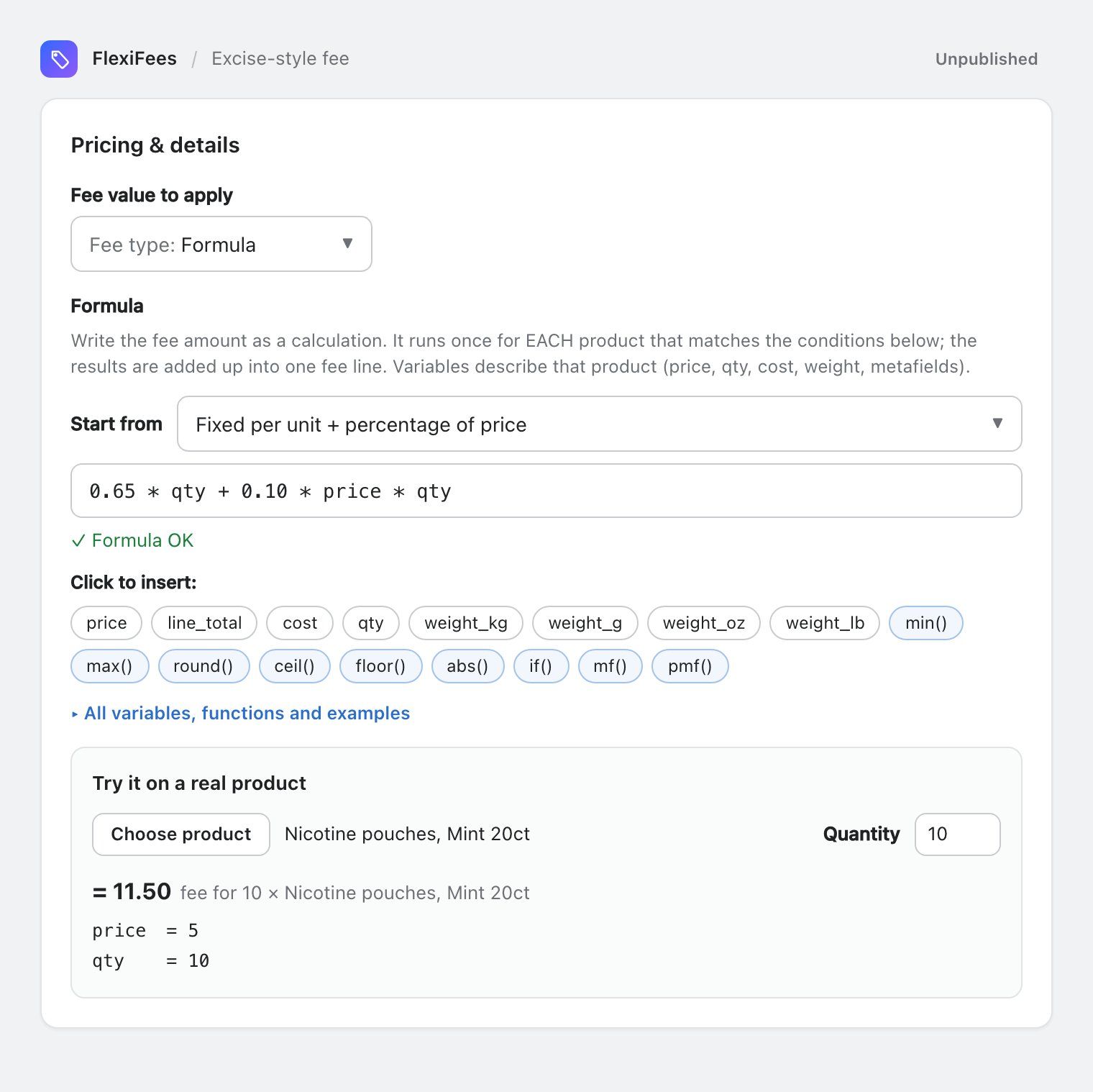
A Formula fee lets you write the fee amount as a calculation, such as 0.65 * qty + 0.10 * price * qty (0.65 per unit plus 10% of the price). Formulas can use price, cost, quantity, weight and metafield values, plus min, max, round and if. The editor checks the formula as you type, and Try it on a real product shows the result for a product from your store before you save.
Set it up
- In the fee, set Fee type to Formula.
- Choose Per product fee or Cart fee first: the scope decides which variables are available.
- Pick a template under Start from, or type your own. Click the chips under Click to insert: to add variables and functions, and use the metafield picker to insert
mf(...)orpmf(...)with a key from your store. - Under Try it on a real product, click Choose product and set a quantity. The panel shows the fee and the value of every variable the formula uses.
- Add conditions and publish.
Per product or cart: how a formula runs
- Per product fee: the formula runs once for each product that matches your conditions. Each result is rounded to cents, and the results are added up into one fee line. A negative result counts as 0 for that product.
- Cart fee: the formula runs once for the whole cart. The result is rounded to cents; a negative result means no fee.
Variables for a per-product formula
| Variable | Meaning |
|---|---|
price | Unit price of the product after discounts, in your store currency |
line_total | Line total (unit price × qty) |
cost | Cost per item of the variant (Shopify's Cost per item); 0 when not set |
qty | Quantity of this product in the cart |
weight_kg, weight_g, weight_oz, weight_lb | Weight of ONE unit in that unit; 0 when the variant has no weight |
mf("namespace.key") | A number from a variant metafield; 0 when missing |
pmf("namespace.key") | A number from a product metafield; 0 when missing |
Variables for a cart formula
| Variable | Meaning |
|---|---|
subtotal | Cart subtotal (discounted prices, fee lines excluded) |
subtotal_cost | Sum of cost per item × qty over the cart |
cart_qty | Total quantity in the cart (fee lines excluded) |
cart_weight_kg, cart_weight_g, cart_weight_oz, cart_weight_lb | Total cart weight in that unit |
sum_mf("namespace.key") | Variant metafield × qty, summed over the cart |
sum_pmf("namespace.key") | Product metafield × qty, summed over the cart |
Functions and operators
| Function or operator | What it does |
|---|---|
min(a, b, ...) | The smallest value |
max(a, b, ...) | The largest value |
round(x), round(x, decimals) | Rounds to a whole number or to the given decimals |
ceil(x), floor(x) | Rounds up or down to a whole number |
abs(x) | Absolute value |
if(condition, value_if_true, value_if_false) | Chooses between two values, for example if(qty >= 10, 0.50, 0.65) |
+ - * / and parentheses | Arithmetic |
< <= > >= == != | Comparisons, used inside if() |
Eight worked examples
| Goal | Formula | Scope | Worked example |
|---|---|---|---|
| Fixed per unit plus a percentage of the price | 0.65 * qty + 0.10 * price * qty | Per product | Price 5.00, 10 units: 6.50 + 5.00 = 11.50 |
| Whichever is higher: fixed per unit or % of price | max(0.65 * qty, 0.02 * price * qty) | Per product | Price 40.00, 2 units: max(1.30, 1.60) = 1.60; price 5.00: 1.30 |
| Lower rate from a quantity | if(qty >= 10, 0.50, 0.65) * qty | Per product | 12 units: 6.00; 4 units: 2.60 |
| Rate per pouch from a variant metafield | 0.05 * mf("custom.pouches_per_can") * qty | Per product | 20 pouches per can, 3 cans: 3.00 |
| Percentage of a wholesale price in a product metafield | 0.40 * pmf("custom.wholesale_price") * qty | Per product | Wholesale 2.00, 3 units: 2.40 |
| Per started kilogram | 1.50 * ceil(weight_kg) * qty | Per product | A 2.3 kg item counts as 3 kg: 4.50 per unit, 2 units: 9.00 |
| Percentage of subtotal with a floor | max(2, 0.03 * subtotal) | Cart | Subtotal 40.00: 2.00; subtotal 150.00: 4.50 |
| Tiered surcharge by cart weight | if(cart_weight_lb >= 100, 0.25 * cart_weight_lb, if(cart_weight_lb >= 50, 10, 0)) | Cart | 120 lb: 30.00; 60 lb: 10.00; 30 lb: no fee |
The editor's templates include more starting points, such as Percentage of cost per item (0.40 * cost * qty), Rate per ounce (0.50 * weight_oz * qty) and Tiered by subtotal (if(subtotal >= 100, 5, 9.90)).
Checking a formula before you save
- Live validation. The editor checks the formula as you type and explains problems in plain English, pointing at the position of the error. A per-product variable used in a cart formula (or the other way round) is flagged.
- Try it on a real product. Choose a product from your store and a quantity; the panel shows the fee and every variable's value, so you can see at once if a weight or metafield is missing.
- Metafield keys. The metafield picker offers your store's own definitions. If you type a key that matches no definition, a quiet warning appears; saving is never blocked.
Limits and rules
- A formula can be up to 400 characters long.
- Like every fee, a formula fee needs at least one condition. For a cart fee that should apply to every order, use Total Quantity in the cart is greater than or equal to 1.
- Results are rounded to cents. A negative result means no fee (per product: 0 for that product).
- A calculation that cannot be completed, such as a division by zero, gives no fee.
- Fee limits (optional) apply to the formula's result; on a per-product fee they apply to the fee's total. You can also write the bound into the formula, as in
max(2, 0.03 * subtotal). - Metafields must hold numbers (number, money or unit types such as weight); empty or text values count as 0. See Metafields in FlexiFees.
Related
- All fee types · Metafields in FlexiFees
- Nicotine and vape excise-style fees · Small order fees · Heavy order surcharges
Questions
Can I combine a fixed amount and a percentage in one fee?
Yes. A formula such as 0.65 * qty + 0.10 * price * qty charges both in one fee line. If you need them on separate lines, create two fees instead.
Can a formula use metafields?
Yes. mf("namespace.key") reads a variant metafield and pmf("namespace.key") a product metafield in a per-product formula; sum_mf and sum_pmf sum them over the cart in a cart formula. Missing values count as 0.
What happens if the formula gives a negative number?
A negative result means no fee. In a per-product formula, it counts as 0 for that product.
How long can a formula be?
Up to 400 characters.