 FlexiFees
How fees appear at checkout
Last updated: September 23, 2026
A FlexiFees fee appears as a normal line item with the title you choose, in the cart, at checkout, and on the order. It is itemized separately from your product prices, can be taxable or not, respects discounts, and can be refunded like any other line.
Where does the customer see the fee?
Everywhere the order is shown:
- Cart page and cart drawer, as soon as the conditions match.
- Checkout, in the order summary next to the products.
- Order confirmation and the customer's email receipt.
- Your Shopify admin, on the order itself, so reports and exports include it.
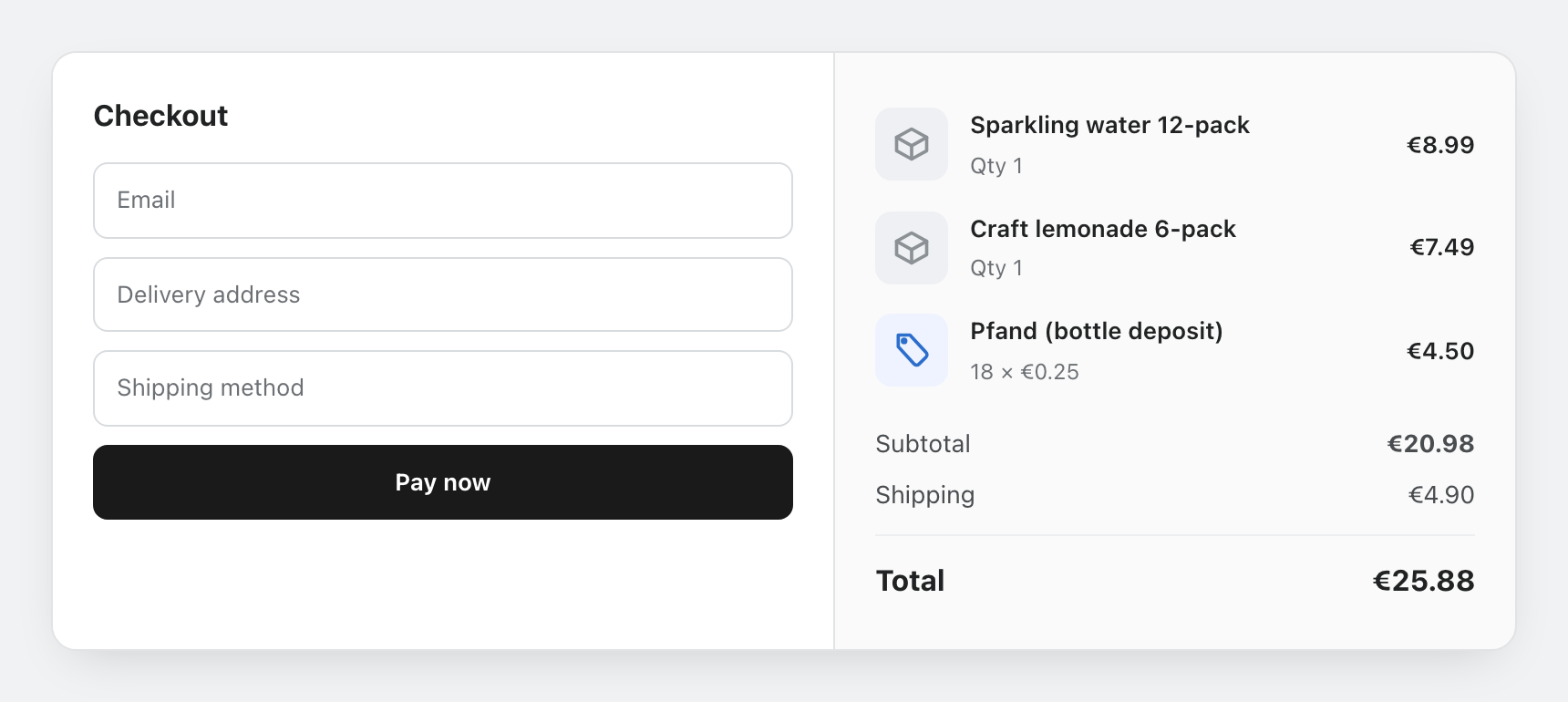
This matters for compliance: bottle deposits, retail delivery fees, and eco fees usually must be shown separately rather than hidden in product prices. A line item with its own label satisfies that, and your customers see an honest total instead of a surprise.
What is the fee called?
You choose the title per fee, and it is exactly what customers read: "Bottle deposit", "Retail Delivery Fee", "Gift wrapping". Some laws prescribe wording, for example Minnesota's "Road Improvement and Food Delivery Fee"; type it once and every order uses it.
Is the fee taxed?
Each fee has its own taxable toggle:
- On (default): the fee is taxed by your normal Shopify tax settings, like any product. California's CRV, for example, is subject to sales tax.
- Off: the fee is excluded from tax. Colorado's Retail Delivery Fee, for example, must not be taxed.
How do discounts interact with fees?
Percentage fees are calculated on the discounted subtotal, so a 10% surcharge on a discounted cart charges 10% of what the customer actually pays. Fixed fees are unaffected by discounts. And with the discount code condition you can waive a fee when a code is applied: see the waiver recipes.
What about multiple currencies?
You define amounts and thresholds in your store currency. On multi-currency storefronts, carts are evaluated consistently against those values, so a "subtotal at least 100" threshold means the same thing for every customer.
Do fees update when the cart changes?
Yes. Fees recalculate as the cart changes: add two more bottles and a per-product deposit grows with the quantity; drop below a weight threshold and the weight surcharge is removed. Date and time conditions are evaluated in your store's timezone.
Can I refund a fee?
Yes. Since the fee is a line item on the order, refund it in the Shopify admin like any other line, fully or partially. Deposits (Pfand, core charges) are commonly refunded when the container or core comes back. Give each fee its own SKU in the fee settings so fee lines are easy to filter in reports and accounting exports.
Can I cap a calculated fee?
Percentage, cost-based, and weight-based fees accept an optional minimum and maximum. A fuel surcharge can be "2% of the subtotal, at most 15", so big carts are not overcharged.
Related
- Getting started: publish your first fee.
- Buy Now guard: keep express checkout from skipping required fees.
- Fee types: the seven fee types and two scopes.