 FlexiFees
Per unit of metafield fees
Last updated: September 23, 2026
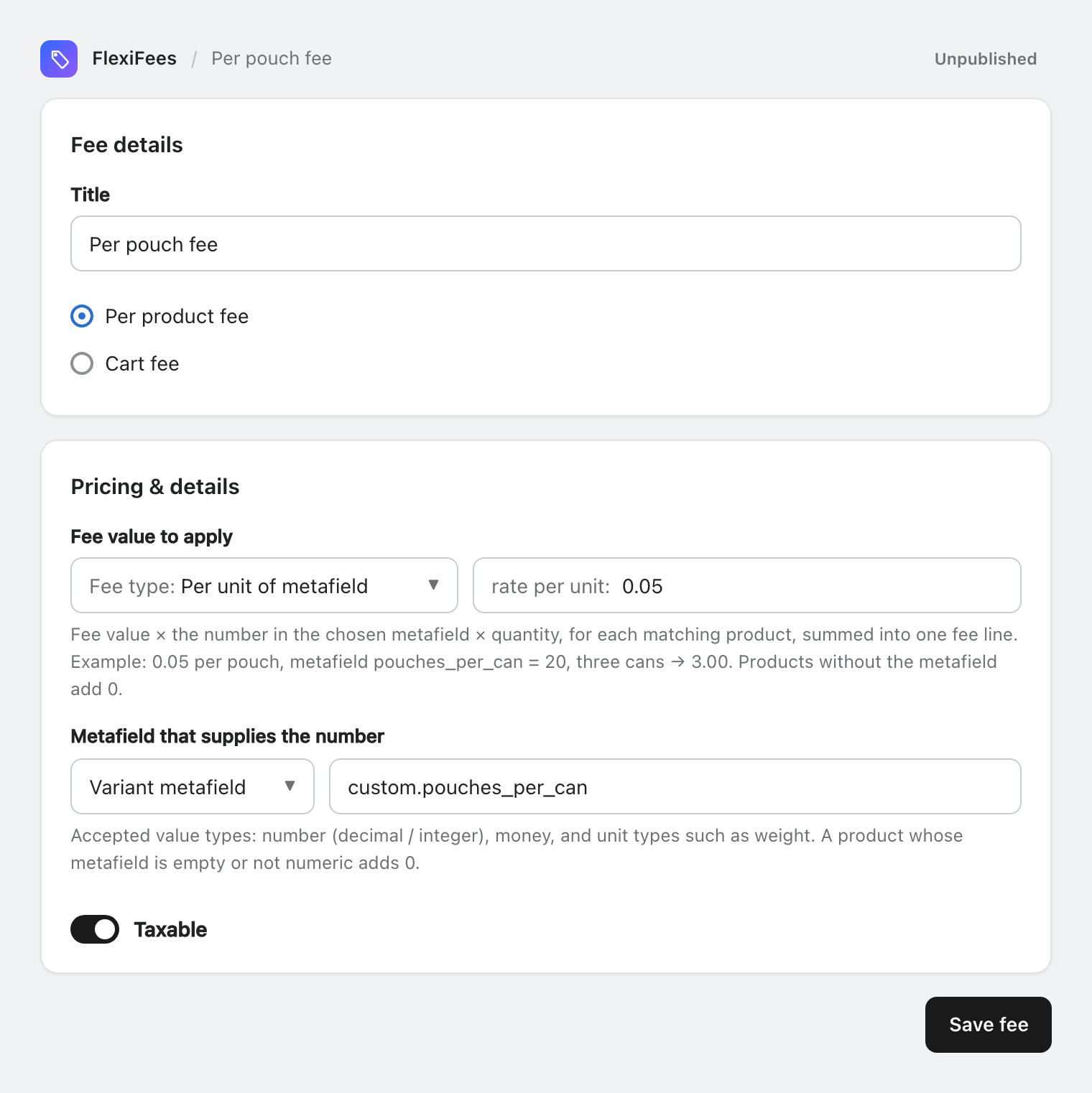
A Per unit of metafield fee charges a rate for every unit of something you store in a product or variant metafield: fee = rate × the metafield number × quantity. Example: 0.05 per pouch, metafield custom.pouches_per_can = 20, three cans = 3.00. Products without the metafield contribute 0.
When to use it
Use it when the fee is set per unit of something Shopify has no field for: pouches per can, grams of sugar per bottle, grams of plastic per package, milliliters of liquid per cartridge. You store that number once per product or variant, and the fee follows it.
Set it up
- Create the metafield. In your Shopify admin, go to Settings > Metafields and metaobjects, choose Products or Variants, and add a definition with the Integer or Decimal type, for example
custom.pouches_per_can. See Metafields in FlexiFees for the accepted types and the Storefronts access option. - Fill in the values on the products or variants that carry the fee.
- Create the fee. Set Fee type to Per unit of metafield and enter the rate per unit.
- Choose the metafield under Metafield that supplies the number: pick Product metafield or Variant metafield, then pick the definition from the list or type its namespace and key.
- Choose Per product fee or Cart fee, add conditions, and publish.
How the amount is calculated
| Scope | Calculation | Example |
|---|---|---|
| Per product fee | Rate × metafield number × quantity, for each matching product, added into one line | 0.05 × 20 pouches × 3 cans = 3.00 |
| Cart fee | Rate × metafield number × quantity, summed over every product in the cart (fee lines excluded) | 0.05 × 20 pouches × 1 can = 1.00 |
Details worth knowing
- Numbers only. The metafield must hold a number, a money amount, or a unit value such as a weight. Empty or text values count as 0. Unit values are read as stored, without conversion.
- Zero means no fee. If no matching product carries the metafield, the total is 0 and no fee line is added.
- Product or variant. Use a variant metafield when sizes differ (a 10-pack and a 20-pack of the same product); a product metafield when all variants share the value.
- Fee limits. A minimum and maximum are available; on a per-product fee they apply to the fee's total.
- Need more than one rate? A Formula can combine
mf("custom.pouches_per_can")with a fixed amount or a percentage.
Related
- Percentage of metafield · Metafields in FlexiFees
- Nicotine and vape excise-style fees, which use a per-pouch rate
Questions
What happens if a product has no value in the metafield?
It contributes 0. If no matching product has a value, no fee line is added.
Which metafield types work?
Number (integer or decimal), money, and unit types such as weight. Text values count as 0.
Can I use it as a cart fee?
Yes. As a cart fee the rate × metafield number × quantity is summed over every product in the cart.